Enrichment columns
Add a research column to a Target, pick a field format and research depth, and see how evidence, empty results, charges and re-runs work.
Last updated 2026-10-23
An enrichment column adds one researched field to every row of a Target, for example the employee count, the main products, or whether the company uses a CRM. RenewSell researches each row separately and writes the value with its source.
This page covers field columns. For finding people and their email addresses, see Find contacts.
Add a column
- Open a Target and click Add Enrichment.
- Pick a preset on the left under RECOMMENDED ENRICHMENTS: Company Size (Employees), Outreach hook or Custom Research. People Targets also offer Work Email, Find Phone, Job Level, Department, Current City and School.
- Fill in Column Name and Instruction for AI. A preset fills both in for you; AI Optimize rewrites your instruction into a verifiable one, and the star next to the name suggests a column name.
- Pick a Data Type.
- Pick a Research depth.
- Check the cost hint, then click Start Enrichment.
Research runs in the background. Cells show their status as they fill in; you can close the dialog and come back later. A toast confirms that the enrichment started.
A Target holds at most 5 enrichment columns. Adding a sixth is blocked with a message telling you to delete one or upgrade.
Field formats
Data Type decides the shape of every value in the column:
| Type | What it holds |
|---|---|
| Text | A short answer taken from or summarised from the source |
| Yes/No | Exactly Yes or No |
| Number (digits only) | A number, no units or separators |
| Date | A date |
| Options | One of the labels you list under Options |
| An email address | |
| Phone | A phone number in international format |
| URL | An https address |
RenewSell rejects a value that does not fit the format instead of storing a partial one. If you pick Options, add at least one label; a value must be one of them.
Research depth
Research depth sets how much reading one cell is worth:
| Depth | What it does | When to use it |
|---|---|---|
| Quick | Fastest, fewest pages read | Values stated plainly on the company site |
| Standard | Reads the company site plus a search or two; the default | Most fields |
| Deep | Widest search and read budget, slowest | Values that are hard to find |
All three depths cost the same per successful cell. Depth buys more reading, not a different price.
If a Quick run finds nothing, RenewSell tries the same cell once more at Standard before giving up, and charges only once, at the depth that produced the result.
What a cell can say
Select a row and open its Full Profile panel. Each enrichment column shows a status:
| Status | Meaning |
|---|---|
| Found | A value with at least one source |
| Not found | No reliable source settled the question; the cell stays empty and is not charged |
| Running | Being researched now |
| Failed | The research failed; Update Missing retries it |
| Canceled | The run was canceled |
A cell marked Not found is a real answer, not an error: RenewSell did not find a source it could stand behind, so it left the value empty rather than guessing.
Evidence
A Found value always carries a reference to the page it came from. Click View Evidence under the field, or the references button, to see the reasoning and every cited page. The cell's thumbnail and the evidence dialog link to the real page, so you can check it yourself.
The References section of the profile panel collects all pages cited for the row, criteria and enrichments together.
What it costs
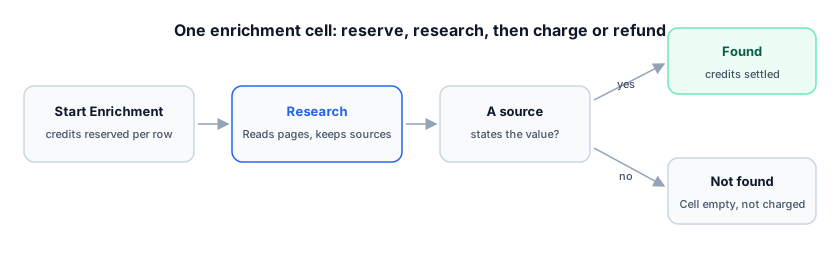
Each successful cell costs 1 credit. An item × field is one unit, so a 25-row Target with a new column reserves 25 credits and settles only for the cells that found a value.
- Not found and Failed cells are refunded, so they cost nothing.
- The dialog shows the estimate before you start: Est. cost, the reserve basis, and No charge for failed requests.
- Rows that are not accepted yet are not priced and not included in that run.
The full price list is on the Credits page.
Fix, re-run and delete
Open the column menu with the arrow in the column header:
| Action | What it does |
|---|---|
| Update Missing | Re-runs the empty and failed cells only |
| Update All | Re-runs every cell at a new version, including the found ones |
| Edit Column | Changes the name and instruction; Save and re-run refreshes all cells |
| Delete Column | Removes the column and its results; this cannot be undone |
A single cell can also be re-run from Full Profile with the refresh icon next to the field. Both re-runs research again and charge per successful cell; a cell that already had a value is charged again if the new run finds one.
While a newer run is working, a cell keeps showing the previous value marked stale, with the tooltip Recomputing — showing the previous value. The value is replaced when the new result arrives.
Opening messages with a column
A column can be marked as the outreach hook, so the Agent opens first messages with it. That setting lives in the column menu as Use as outreach hook and is explained on Personalized openings: outreach hooks.
Marking or unmarking a column does not re-run research and costs nothing.
FAQ
Why is a cell empty? RenewSell found no source it could rely on. Empty cells are not charged, and Update Missing retries them.
Can I edit a value by hand? Enrichment values are research results; the supported edit is to change the column instruction and re-run. To overwrite an existing column, use Update All in its header menu.
Do the three depths cost different amounts? No. One successful cell costs 1 credit at any depth.
Does deleting a column remove the credits I paid? The credits already spent stay spent; deleting removes the column and its values from the Target.