Personalized openings: outreach hooks
Open first messages with recent company news or the contact's own LinkedIn post, and see when it applies, how to set it up and how to check it.
Last updated 2026-10-23
A first message that opens with something specific that just happened to the recipient gets more replies than "We are a professional manufacturer of…". That specific thing is the outreach hook.
RenewSell has two kinds of hooks: recent company news, and the contact's own recent LinkedIn post. This page explains how the Agent picks one, when hooks apply, how to set them up, and how to check what a sent message used.
Two kinds of hooks
| Company hook | Personal hook | |
|---|---|---|
| What it is | One recent event at the company: hiring, funding or expansion, a new product or certification, a trade show, a leadership change, news on its website | One recent LinkedIn post by the contact |
| Time window | Last 90 days; up to 180 days if nothing newer exists | Last 90 days |
| Where to set it | An enrichment column in the Target, marked as the outreach hook | The Open with the contact's recent LinkedIn post switch in Smart Outreach |
| Requirements | The column exists and found a value for the company | The contact has a LinkedIn URL and you connected LinkedIn in Connect |
| Cost | Charged like any enrichment value; nothing when no value is found | No credits |
How the Agent picks an opening
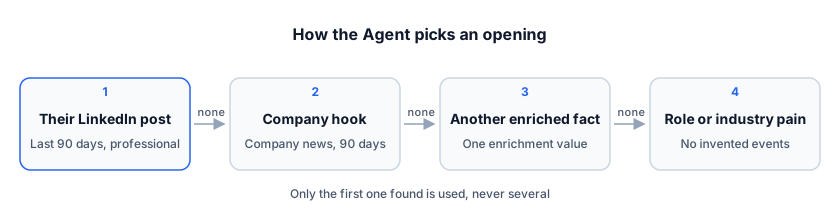
The Agent goes through the order above and uses only the first one it finds. It never stacks several facts:
- If the contact posted something work-related in the last 90 days, it mentions the topic of that post in its own words.
- If there is no suitable post, it uses the company hook.
- If there is no company hook, it uses one fact from another enrichment column, such as the main products.
- If there is nothing at all, it opens with a pain point typical for the contact's role or industry. It never invents a specific event or date.
Also:
- The Agent rewords the hook in the language of the message. It never pastes it as is, and never links to the post or the news page.
- Posts about private life, family, health, politics or religion are never used. The Agent falls back to the company hook instead.
When hooks apply
Hooks are only used for the first contact with someone:
- The first message Smart Outreach sends (email, LinkedIn or WhatsApp)
- The note on a LinkedIn connection request
- The first direct message after they accept the request
Follow-up emails, replies to customers and inbound Agent conversations don't use hooks.
NOTE
Previews and test conversations never read LinkedIn posts, so the opening in a preview can differ from the message that is actually sent.
Set up the company hook
-
Open a Target and click Add Enrichment.
-
Pick the Outreach hook preset.
-
Confirm. RenewSell researches one event per company and writes it in the column as "what happened — date — why it may matter to you". Open a cell to see the source page.
If you already have a suitable enrichment column, use it instead: open the column menu and choose Use as outreach hook.
- A Target has at most one outreach hook column. Marking another column moves the hook to it.
- Marking or unmarking a column doesn't re-run research and costs nothing.
TIP
You can edit the preset's research instructions. If certain signals matter in your industry, such as "hiring buyers" or "started importing from China", add them to the instructions and list them first.
Set up the personal hook
The personal hook is on by default. To turn it off, open Smart Outreach in the Target and switch off Open with the contact's recent LinkedIn post. When it's off, RenewSell never reads LinkedIn while writing.
When it's on, RenewSell reads the contact's posts with your connected LinkedIn account before writing a first-contact message:
- The result is kept for 7 days, so writing to the same contact again within 7 days doesn't read LinkedIn again.
- If the sequence has a "like" step, the post read for the like is reused as the hook, with no extra read.
- If reading fails or times out, the message still goes out and uses the company hook or other information instead.
NOTE
LinkedIn limits how many profiles an account can view per day. Reading posts counts toward that limit, so with many contacts it can affect other LinkedIn steps on the same account.
Check what a message opened with
In the Agent's Conversation Inbox, first messages sent by Smart Outreach show a line underneath:
- Opened with: company news · link: the opening used the company hook; the link is the source page of the event.
- Opened with: their LinkedIn post (2026-10-05) · link: the opening used the contact's post; the date is when it was posted.
No line means the message didn't use a hook. Messages sent before 2026-10-22 have no record.
FAQ
Why is the outreach hook empty for some companies? RenewSell found no dated, sourced event for that company in the time window. It never fills the cell with a company description or undated content, and an empty cell costs nothing.
What happens if my template uses {{hook}}?
The Agent writes one sentence for {{hook}} following the order above. See Template variables.
I only want personal hooks, not company hooks. Don't mark any column as the outreach hook. If one is marked, choose Remove outreach hook in its column menu.