Bot notifications
Push replies, hand-offs, failed sends and new opportunities to a Feishu, DingTalk or generic webhook bot, and verify each delivery.
Last updated 2026-10-23
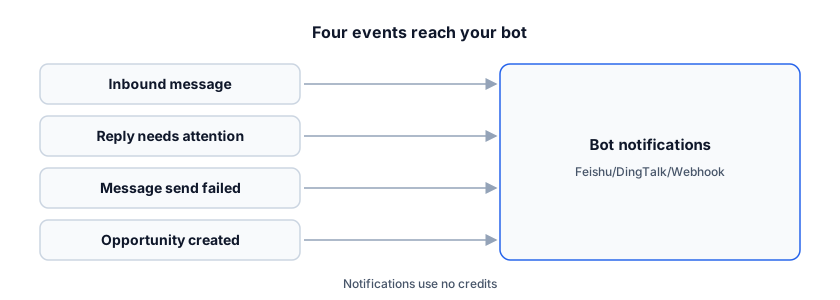
You do not have to keep the inbox open. RenewSell can push four kinds of events to a bot in a Feishu/Lark group, a DingTalk group, or any HTTPS endpoint you control.
This page explains which events exist, how to add a bot, how signing works, and how to check whether a message was delivered.
Set up a bot
- Open Settings and choose Notifications.
- In the Bot notifications card, fill in the form under Add a bot endpoint.
| Field | What to enter |
|---|---|
| Type | Feishu / Lark, DingTalk or Generic webhook |
| Name | A name you recognise in the list |
| Webhook URL | The bot's webhook address |
| Signing secret (optional) | The secret from the same bot, if you use signing |
| Events | At least one of the four events below |
- Click Add bot.
The list then shows the bot's name, its address (host only), its events, its on/off switch, the last delivery result, Test and Delete.
Feishu / Lark: in the group, add a custom bot, copy its webhook URL, and turn on signature (加签) in the bot if you set a secret here. DingTalk: in the group, add a custom bot, copy its webhook URL, and turn on signature (加签) if you set a secret. Generic webhook: an HTTPS JSON POST; when a secret is set, the request carries a signature in the header (see below).
The URL and the secret are stored encrypted and are write-only: after you save, the full URL is never shown again, and the list keeps only the host.
The four events
| Event | Sent when |
|---|---|
| Inbound message received | A customer message arrives in an Agent's inbox |
| Reply needs attention | The Agent hands a thread to you or stops replying |
| Message send failed | A message failed for good, after the send attempts are exhausted |
| Opportunity created | A new customer signal is recorded (see Opportunities) |
Feishu and DingTalk receive a short Chinese text message with the contact and company, plus what that event has: the channel and preview for a new reply, the channel and reason for a hand-off, the channel and failure code for a failed send, and the grade and summary for an opportunity. The generic webhook receives an English JSON body:
{
  "event": "message.received",
  "occurredAt": "2026-10-23T09:15:00.000Z",
  "data": { "contactName": "…", "companyName": "…", "channel": "email", "preview": "…", "link": "…" }
}
Each event fills data with its own fields, for example the failure code for Message send failed or the grade and summary for Opportunity created.
Signing
- Feishu: the timestamp and signature are added to the JSON body, following Feishu's custom-bot rules. Turn on signature in the bot and use the same secret here.
- DingTalk: the timestamp and signature are appended to the webhook URL as query parameters. Turn on signature (加签) in the bot and use the same secret here.
- Generic webhook: with a secret, every request carries a request header whose value is
sha256=<hex HMAC of the request body>. Verify it before you trust the payload.
Test and delivery
Test sends a fixed test message to that one bot, so you can check the address and the secret without waiting for a real event. A test result is also written to Last delivery: ok · 2026-10-23 09:15.
- Only HTTPS addresses are accepted; redirects are not followed.
- Feishu/Lark bots must be on
open.feishu.cnoropen.larksuite.com; DingTalk bots must be onoapi.dingtalk.com. A generic webhook can be any public HTTPS address. - Each attempt times out after 5 seconds and is tried once more. If both attempts fail, the delivery is only recorded as failed; there is no later retry.
- Notifications use no credits and never change the message, the reply or the opportunity; a failed delivery is only recorded.
- DingTalk itself accepts at most 20 messages per minute from one bot; bursts beyond that are rejected by DingTalk.
Reception Agents
A reception Agent's hand-off, stop and reply-limit events, and the opportunity it creates when it finishes collecting information, go only to the bots you tick in that Agent's Notification channels (multiple allowed) setting, whatever events those bots subscribe to. Incoming customer messages still follow the Inbound message received subscription. If the Agent has no bot selected, nobody is notified for those Agent events.
FAQ
Why does no notification arrive? Check that the bot is switched on, that the event is included in its Events, that the address is HTTPS and on an allowed host, and, for a reception Agent, that the bot is selected in the Agent's notification settings. Last delivery shows the most recent attempt.
Can I see or edit the saved URL? No. The URL and the secret are write-only. To change the address, add a new bot and delete the old one.
Does a failed notification affect the conversation? No. Delivery is best effort and separate from the inbox; the message, the reply and the opportunity are unchanged.