Criteria and match status
How RenewSell checks each criterion one at a time, what every Result pill means, and where to read the evidence behind a verdict.
Last updated 2026-10-23
Criteria are the conditions every result must meet. RenewSell checks them one at a time and records a verdict and its sources for each. This page explains what those verdicts mean and how to read them.
How criteria are made
When you create a list, RenewSell turns your description into up to five criteria. Each one is a sentence that can be answered yes or no about a single company or person, for example "Imports outdoor furniture" or "Has at least 20 employees".
You can change them before the search starts, and again later:
- In the workspace, click the pencil next to Criteria.
- Edit the text, add a criterion with Add Criteria, or remove one with the X on its row.
- Click Save. Editing needs the search to be stopped.
A list can hold between one and five criteria. Every criterion needs text; an empty one blocks the save.
Exclude turns the selected criterion into a negative one: the row then has to not match it. Use it for things you want to filter out, such as a country or a competitor.
Checked one at a time
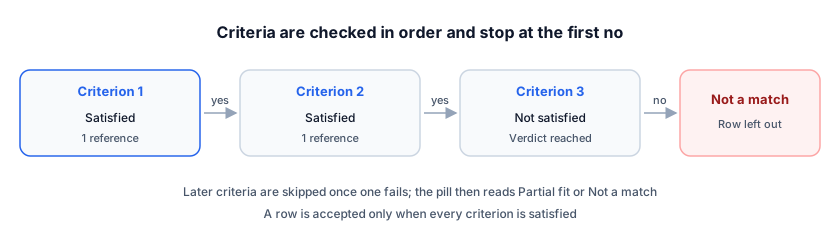
Criteria are hard conditions: a row must satisfy all of them. RenewSell checks them in order and stops early when one fails, so a row usually has one decided criterion while the rest are still queued. This is why the Result pill never treats partial coverage as a verdict.
Searching and evaluating candidates are free. A result costs credits only when it is accepted into the list; see Create a Target list.
What the Result pill means
| Pill | Meaning |
|---|---|
| Evaluating 1/3 | The search is still running; the numbers are satisfied criteria out of the total |
| High fit | Every criterion is satisfied, and each one has at least one reference |
| Clear fit | Every criterion is satisfied, but a reference is missing on at least one |
| Partial fit 1/3 | At least one criterion is already ruled out (not satisfied or insufficient evidence), and at least one is satisfied |
| Not a match | No criterion is satisfied. These rows are hidden unless you click Show non-matching |
| Evaluation failed | A criterion's evaluation failed while the search can still retry it |
| Not evaluated | The search stopped before this row was decided |
| No criteria | The list has no criteria at all |
High fit and Clear fit both mean a real match. The difference is only whether every criterion carries a citation.
A row that met every criterion after the list was already full is not a result at all. It stays out of the list, is not charged, and carries the note Qualified · over target, not added under its name in the Company column. Continuing the search adds those rows first.
Two rows can look identical but differ: Evaluating means more work is coming, Not evaluated means it stopped. Not evaluated rows are not charged.
Criterion evaluation
Select a row to open its Full Profile panel. The Criteria Evaluation section lists every criterion with its own status:
| Status | Meaning |
|---|---|
| Satisfied | A readable source confirmed it |
| Not satisfied | A readable source showed the opposite |
| Insufficient evidence | Nothing readable settled it either way |
| Running | Being checked now |
| Failed | The check failed; the search may retry it |
| Skipped (an earlier criterion failed) | Never checked, because a higher criterion already failed |
| Pending | Queued, not started |
Under each status you see the Agent's reasoning: the sentence it wrote to explain the decision, in the list's output language.
A Satisfied verdict always carries at least one reference. RenewSell does not accept a positive verdict without one. Insufficient evidence is not the same as Not satisfied: it means the sources could not answer the question, not that the answer is no.
Evidence and sources
Click the references button under a criterion, which reads for example 3 references, to open the evidence dialog. It shows:
- The verdict and the reasoning.
- Every page the Agent cited, with its title and URL.
The links open the real pages in a new tab, so you can check the claim yourself. View Evidence in the Full Profile panel opens the same dialog for an enrichment value.
The References section of the panel collects every page cited for that row, criteria and enrichments together, without duplicates.
NOTE
References point at pages the Agent actually read in that run. A link that no longer resolves means the page changed or went offline since, not that the verdict was invented.
The percentage next to a criterion
In the Criteria card, each criterion shows a percentage. It is the share of evaluations that passed, for example 2/3 evaluations satisfied. A low percentage on one criterion is a signal that the criterion is too narrow: the stop banner points at it as a bottleneck when it stops the search.
If this keeps happening, edit the criterion or add Exclude conditions instead, then click Continue finding.
When a row is not what you wanted
- Hidden but relevant: click Show non-matching in the toolbar to bring back rows with no satisfied criterion.
- Wrong criteria: stop the search, edit them, then start again.
- A specific value looks wrong: open the evidence dialog and check the cited page. If the page is right, the criterion wording is usually the problem.
FAQ
Why does a row with a satisfied criterion show Not a match? Because another criterion was decided as not satisfied. All criteria must hold, so one clear "no" is enough.
What is the difference between Insufficient evidence and Not satisfied? Insufficient evidence means the sources could not settle it; Not satisfied means they showed the opposite. Both keep the row out of the list.
Does editing criteria cost anything? Saving new criteria does not charge by itself. Evaluating candidates is free; the rows that are accepted after a new search are charged like any accepted result. The full price list is on the Credits page.