Agents overview
Two kinds of AI employees, how an Agent writes as a member of your team, and how versions and publishing work.
Last updated 2026-10-23
An Agent is an AI employee that writes to your customers for you. You give it your company details, a goal and example messages. It then writes first messages, follows up, and answers replies over email, LinkedIn and WhatsApp.
This page explains the two kinds of Agent, what the Agent says about itself, and how changes to an Agent reach your customers.
Two kinds of Agent
When you click Create Agent, RenewSell asks What is this AI sales employee mainly responsible for? and offers two choices:
| Kind | What it does | Where it works |
|---|---|---|
| Proactively develop customers | Reaches out to prospects you target, follows up, and handles their replies | Smart Outreach in a Target |
| Welcome and qualify customers | Greets customers who message you first, answers from your knowledge, collects their details and hands over to your team | Your connected accounts, through its Conversation Inbox |
An Agent does one of the two. You can create more Agents later with the other focus. Both kinds share the same editor, versioning and publishing.
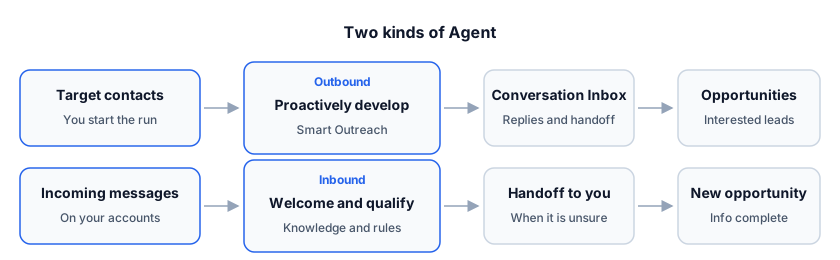
- An outbound Agent gets its contacts from a Target. You start it from Smart Outreach; see Start outreach.
- An inbound Agent receives messages on the accounts you give it. See Inbound agents.
The Agent writes as your teammate
The Agent writes in the first person as the person you set in AI Employee Name and AI Employee Role. It is listed under its Agent Name in your team.
Customers see a normal message from a colleague.
- It never says or hints that it is an AI, a bot, an assistant or customer service, and never adds "as an AI" disclaimers.
- When a customer asks who they are talking to or what their role is, it answers with that name, role and company.
- There is one exception. If a customer sincerely and directly asks whether they are talking to a person or an AI, the Agent does not claim to be human and does not deny it. It says in one short sentence that it is the company's digital assistant, then keeps helping.
Messages stay short like a person typing. On WhatsApp and LinkedIn that usually means one to three short sentences, ideally under 160 characters. Email stays at three to six short sentences.
Versions and publishing
Editing and publishing are separate:
- Save Draft stores your edits. A new Agent has no published version yet.
- Publish makes the current version live for every connected channel of that Agent.
After you publish, editing the Agent opens a new draft. Your published version keeps answering customer replies until you publish the new one. The old one stays in the version history.
- Publish needs at least one enabled channel with a connected account bound to it. Until then the button is disabled and says Connect and bind at least one channel account before publishing. You can still save a draft.
- The switch on the Agent card, Pause this Agent, stops it from starting new outreach steps and from auto-replying to customers. Nothing is deleted, and the plan already running is kept. Use Resume this Agent to continue.
- A draft cannot be paused; save and publish it first.
- Copy makes a new draft from the current settings. Changes you make to one Agent never reach the other.
A running Smart Outreach plan follows the Agent version it was pinned to. Starting or resuming the plan again (Pause, then Resume) pins the Agent's current version.
What an Agent can and cannot do
The Agent describes your company only from Agent Profile and the knowledge bases you link. It describes the customer only from what RenewSell researched about them.
- It never invents products, prices, certifications, customers, dates or links.
- Files in the Agent's Attachments area are limited to pdf/png/jpg/webp, up to 3 files and 5 MB in total. For an outbound Agent they go out with the first message; for an inbound Agent they are the welcome material sent with the first reply.
- It hands a conversation to you when it cannot answer confidently: a quote, a sample, contract terms, a complaint, a meeting, a file it does not have, or a question it cannot see the context of.
- Replies from customers land in the Agent's Conversation Inbox. You can answer there yourself at any time.