Core concepts
How Targets, Criteria, enrichment, contacts, Agents, Smart Outreach, conversations and credits fit together.
Last updated 2026-10-23
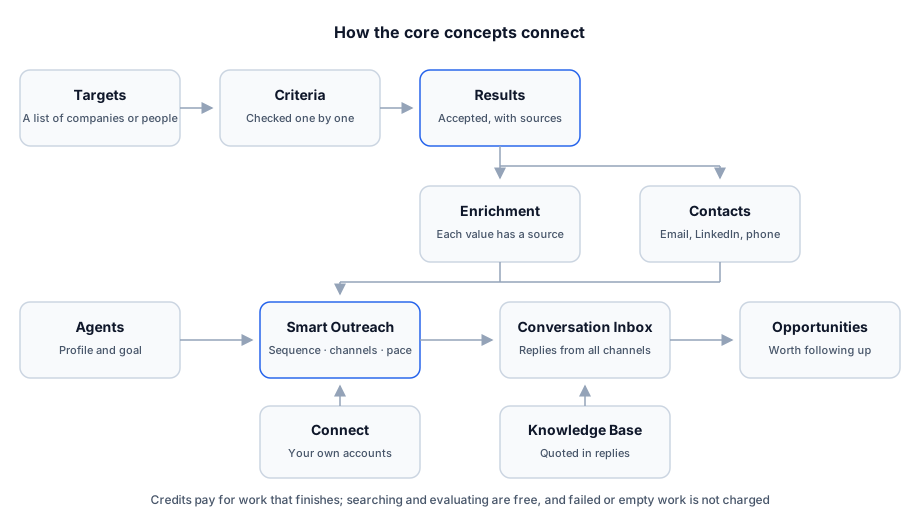
Every screen in RenewSell belongs to one of a few ideas. They feed each other in a fixed order. The order starts with a list of Targets and the Criteria that decide who joins it. Next comes the research attached to each result. After that come the people at those companies, the Agent that writes, and the plan that sends.
This page defines each idea and shows how they connect. Read it once, then follow the Quickstart to use them.
Targets and Criteria
A Target is one list of companies or people you want to reach. You create it by describing your ideal customer; RenewSell turns the description into Criteria.
A Criterion is a hard requirement, not a ranking. A company joins the list only when every Criterion is satisfied. Criteria are AND-ed, and a failed one ends that candidate's evaluation immediately, so later Criteria are not checked.
Targets come in two entity types: Companies and People. A People Target's rows are the people themselves; a Companies Target's rows are companies, with contacts found separately.
Each result row carries a Result pill. It never reads partial progress as a verdict. A row is High fit or Clear fit only when every Criterion is satisfied. Otherwise it is Partial fit, Not a match, Evaluating, Not evaluated, Evaluation failed or No criteria.
Enrichment and evidence
An enrichment column adds one researched value per result, for example main products, employee count or a recent company event. You can have up to 5 enrichment columns per Target.
Every non-empty enrichment value cites the page it came from. When there is no reliable evidence, the cell stays empty; that empty cell is not charged. A column keeps its last result, and a re-run marks the old value stale until the new one lands.
Contacts are a special kind of enrichment result. Instead of one value per company, contact discovery writes contact records into a Key contacts or Official Website Contacts column. A record holds a name, title, email, LinkedIn and phone. They are billed per unique company domain, not per person.
Agents
An Agent is the AI teammate that writes and replies. It holds a profile (whose name the message is signed with), a goal, example messages, sending rules and an outreach sequence.
- An Agent has draft and published versions. Editing a published Agent opens a new draft; publishing makes that version live.
- Publishing needs at least one connected and bound channel account.
- There are two kinds: Proactively develop customers (outbound) and Welcome and qualify customers (inbound). The inbound Agent answers people who message you first.
A Target does not belong to an Agent. The same Target can be worked by different Agents, and each Agent keeps its own plan per Target.
Smart Outreach
Smart Outreach connects one Target with one Agent and turns contacts into a sending plan.
A plan covers the contacts admitted to it. Each contact follows the Agent's sequence in a fixed channel order: email, LinkedIn like and invite, WhatsApp, and a single email follow-up. The Agent's Sending Rules decide which channels may send, the Active window, and the daily and hourly caps. The Outreach section decides the gap between steps, how many people per company and when to close a contact with no reply.
Not every contact enters a plan. The Audience panel names the reasons: unreachable (no address on any enabled channel), held back by the company cap, or already with another Agent. One contact is never in two open plans at once.
Conversations and opportunities
Replies land in the Agent's Conversation Inbox, alongside any conversation the contact started. With Auto reply on, the Agent answers from the Knowledge Base; otherwise the thread waits for you. Marking a thread as a complaint suppresses that address on that channel, and future sends skip it.
Opportunities is a read-only board built from the conversations. It shows signals such as a positive reply, a pricing question, a meeting intent or an unsubscribe, plus the Agents' activity behind them.
Credits
Credits pay for finished work, not for trying. Searching and evaluating candidates are free. You pay for each accepted result that meets every Criterion, each successfully enriched field, and each contact domain looked up. You also pay for each verification, each message sent, and each connected account's maintenance.
The ledger reserves an estimate before work starts and settles on the real amount afterwards. A failed or empty result returns the hold. Monthly plan credits reset on your monthly anniversary; purchased credits do not expire. See the pricing page for the current rates.
NOTE
Previews and test conversations never send and never charge. Send First 5 does send, so it charges like any other message.
How the pieces relate
- A Target has Criteria, results, enrichment columns and contacts. It does not need an Agent.
- An Agent needs a Target and contacts before it can send anything, and it needs a connected channel to publish.
- A plan belongs to one Target and one Agent; its contacts come from that Target.
- Conversations and opportunities follow from sent messages; they never create themselves.