Knowledge Base
Turn a website, documents or a FAQ table into Q&A entries the Agent answers from, add reply attachments, and test what a question retrieves.
Last updated 2026-10-23
The Knowledge Base is what an Agent may quote when it answers. You turn a website, uploaded documents or your own question-and-answer rows into entries, tick the bases on the Agent, and the Agent searches them before it states a product, price, lead-time or policy fact.
This page explains the three ways to fill a knowledge base, how generation works, and how the Agent uses the result.
Create a knowledge base
Open Knowledge Base in the navigation. New knowledge base opens the generation page with three modes:
| Mode | What you provide |
|---|---|
| Generate from website | One or more pages of your site; each URL is a separate source |
| Generate from documents | PDF, Word, spreadsheet, HTML, text or image files; each file is a separate source |
| Import FAQ table | Question and answer rows typed in or imported from a CSV file |
Blank knowledge base creates an empty base for entries you write by hand.
Limits per source
- A knowledge base accepts at most 25 sources.
- Website sources are read from the same site only, up to 12 pages per source; each source produces at most 40 Q&A entries.
- Documents can be up to 10 MB each (images 5 MB). Supported formats include PDF, DOCX, ODT, HTML, XML, CSV, XLS/XLSX/ODS, TXT, Markdown and images; DOC, PPT and RTF are not supported. Each file is generated on its own.
- A scanned PDF without a text layer cannot be read; the source fails with a message asking for a text version.
- A FAQ table accepts at most 100 rows. Each complete row becomes one entry, word for word, with no model involved. Download CSV template gives you the columns: category (optional), question, answer.
Generation
- Add the sources and click Start generation.
- The page moves to the knowledge base and keeps polling. After submission, generation continues in the background. You can safely leave this page.
- Each source shows its own status: Queued, Running, Ready, Failed or Canceled. One failed source does not stop the others.
- When sources fail or are canceled, open the more-actions menu and choose Retry generation; only those sources are generated again.
Generation is included: the page shows Included · No generation fee, and no credits are charged for building a knowledge base.
Manage the Q&A
The detail page has three panes: question categories, the imported sources, and the Q&A list with the editor.
- Question categories filters the list; All questions shows everything.
- Use the search box to find a question or an answer.
- New Q&A creates an entry by hand: Question, Answer and Category (optional); you can leave the category empty.
- Reply attachments adds up to 5 files to one entry. When a reply relies on that entry, the Agent can send those files along with it, up to 3 files in one reply.
- Delete knowledge base removes the base and all of its Q&A; Agents that used it stop using its content.
Test retrieval
Test retrieval runs the same search the Agent uses. Enter a question a customer might ask and the dialog lists the matching entries with a score and where the hit came from: Semantic, Keyword, or Semantic + keyword. An empty result means the Agent would not have this answer either.
How the Agent uses it
Open an Agent and expand Knowledge base (What can the Agent quote when it answers?). The list contains the bases with status Ready; tick the ones this Agent may quote.
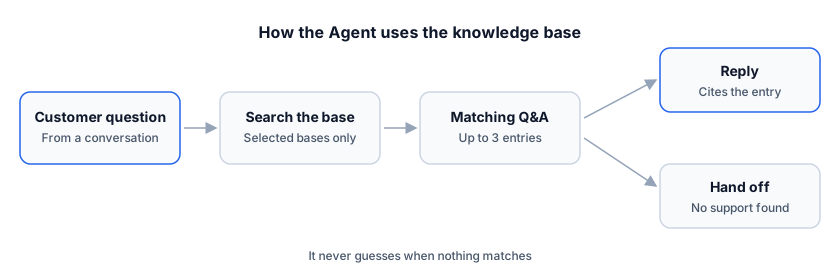
- Auto-replies search the ticked bases before answering product questions, at most 3 searches per reply and up to 3 entries each.
- The Agent answers only from the entries, the sender profile and the message context. It never invents a price, a lead time, a certification or a policy.
- When nothing in the bases supports an answer, the Agent hands the conversation to you instead of guessing. See The conversation inbox.
- If no base is ticked, the Agent has nothing to search and will hand off more often.
FAQ
Do I pay for generation? No. Building a knowledge base is included and does not consume credits.
Why did one source fail? Common reasons are an unreachable website, an unsupported file type, a file above the size limit, or a PDF without a readable text layer. The failed source shows the reason and the others stay ready; fix the source and use Retry generation.
Why does the Agent not use my new entry? The Agent searches only the bases ticked in its Knowledge base section, and only entries with status Ready. Save the entry and check the Agent's selection.
Can I edit a generated entry? Yes. Select it in the Q&A list, change the question, answer, category or attachments, and click Save changes. Editing does not regenerate the rest of the base.