Browser extension
Find and verify work emails on any company website or profile page
Open a company website or a LinkedIn profile, click the RenewSell icon, and get the people and work emails behind it, each one verified. Nothing is read until you click.
The Chrome Web Store listing is coming soon. You can install it manually in about a minute, see below.
Free: 50 lookups and 100 verifications every month. No credit card.
Works on LinkedIn profiles and company pages. RenewSell is not affiliated with LinkedIn.
Where it works
Three ways to get a verified work email
01
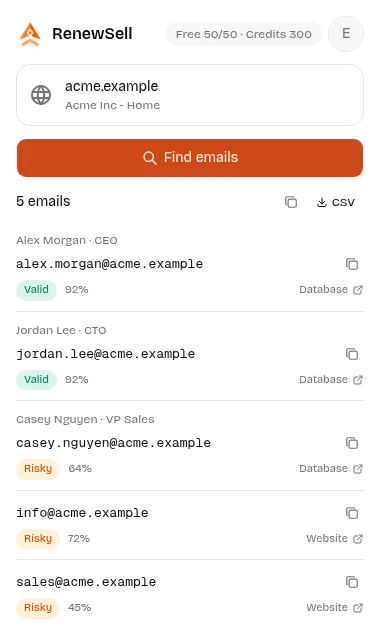
On any company website
Click the toolbar icon on a company site. The extension reads the domain of the tab you are on and lists the emails we know for it, with name, job title, source and a confidence score. Emails found on the company's own pages arrive a few seconds later.
Company website 02
On LinkedIn profiles and company pages
On a profile, a Find email button reads the name, headline and current company you are looking at and returns the most likely work email. On a company page it uses the company website to list its emails. One page at a time, only when you click.
Works on LinkedIn profiles and company pages. RenewSell is not affiliated with LinkedIn.
Profile page 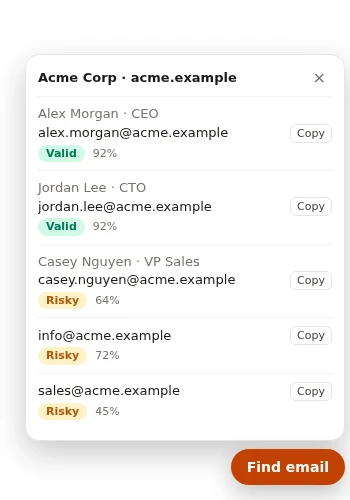
03
Paste a list and verify it
Paste up to 25 addresses, or right-click selected text and choose verify. Every address comes back as valid, invalid, risky or unknown, so you stop sending to addresses that bounce. Lookups are verified automatically.
Verify emails 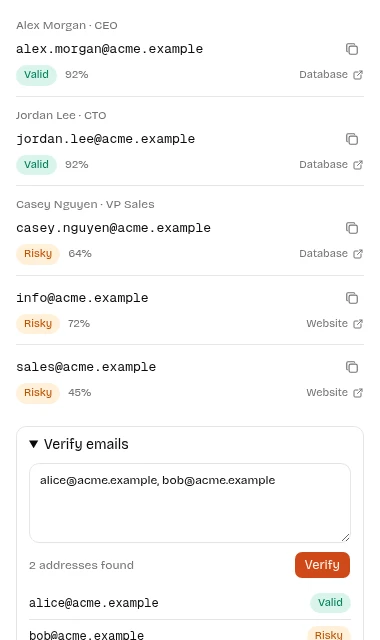
Free to start
Free every month, no credit card
Create an account with your email and the free pool is yours. It resets each calendar month. When it runs out you can keep going with credits, or wait for the reset.
- lookups per month
- 50
- verifications per month
- 100
- cached results never use your quota
- 30 days
- credit card required
- $0
Privacy promise
It reads the page only when you click
No background reading
The extension has no access to all sites. It sees the address of the tab you are on only after you click its icon.
One page, never a list
No auto-paging, no hidden tabs, no scraping of search results or employee lists. We never call LinkedIn or act on your behalf.
Sent to RenewSell only
What you look up goes to renewsell.com and nowhere else. We do not sell data. Anyone can ask to be removed from results.
Manual download
Install without the store
Cannot reach the Chrome Web Store, or prefer a file? Download the package and install it yourself. It takes about a minute.
Chrome, Edge, 360, QQ and other Chromium browsers
Download for Chrome (.zip)- 1Download the zip file and unzip it into a folder you will keep.
- 2Open chrome://extensions in the address bar (edge://extensions in Edge) and turn on Developer mode.
- 3Click Load unpacked and select the unzipped folder.
- 4Open the puzzle-piece menu and pin RenewSell to the toolbar.
Chrome keeps loading the extension from the folder you unzipped, so do not delete or move it.
Firefox
Download for Firefox (.xpi)- 1Download the .xpi file.
- 2Open it in Firefox: drag the file into a Firefox window, or choose File, Open File.
- 3Click Add when Firefox asks, then pin RenewSell from the extensions menu.
Manual installs do not update automatically. When a newer version is required, the extension tells you and links back to this page: download it again and repeat the steps.
If a download does not start, the package is not published yet. Please check back soon.
FAQ
Questions about the extension
Yes to start. Every verified account gets 50 lookups and 100 verifications each month with no credit card. Results we already have cached do not use your quota. After the free pool you can use credits.
Chrome, Edge and other Chromium browsers (including 360 and QQ) with the zip package, and Firefox with the .xpi package. Store listings are coming; the manual download works today.
Only when you click the toolbar icon or the Find email button. On a company website it reads the domain. On LinkedIn profile and company pages it reads the name, headline, company and website shown on that one page. Nothing is read in the background.
It works on LinkedIn profiles and company pages that you have open. RenewSell is not affiliated with, endorsed by or sponsored by LinkedIn. The extension does not call LinkedIn or send requests on your behalf, and it does not batch or auto-page.
Valid: the mailbox exists and accepts mail. Invalid: it will bounce. Risky: it may work but cannot be confirmed, for example a catch-all domain. Unknown: the mail server did not answer in time, and you are not charged for it. The free email verifier explains each status.
Manual installs do not update on their own. When the extension needs a newer version it shows a notice with a link to this page. Download the latest file and repeat the install steps; your account and settings stay.
Get started
Find the right email in seconds
Free monthly lookups. Install it, click the icon on any company website, and see who you can reach.