Trade-show follow-up
Follow up every trade-show lead within 72 hours
After the Canton Fair or any other trade show, import your business-card list and RenewSell completes the company info, finds and verifies contacts, and sends follow-ups in the buyer's language through your own accounts. Replies land in one inbox, answered first by AI from your own material. Importing is free.
Updated 2026/10/27
The free plan includes 300 credits a month. Sending needs a paid plan with a connected mailbox.
When to use it
- Canton Fair spring · Apr–May
- Canton Fair autumn · Oct–Nov
- Any other fair · all year
A suggested rhythm after the fair
- 1Day 1: import the card list and check the column mapping
- 2Day 2: complete companies, find and verify contacts
- 3Day 3: preview, then send the first messages from your own accounts
The problem
The fair ends. The follow-up usually does not start.
Cards pile up
Hundreds of cards, a photo album and a half-filled Excel sheet. Nobody knows who has been written to.
Buyers go cold
A buyer met at your booth meets dozens of other suppliers that week. The first reply usually wins the conversation.
Writing one by one does not scale
Researching each company and writing each email in the right language takes your sales team days.
Before and after
From a drawer of cards to a list you can act on
After a fair, usually
- Cards in a drawer and notes in a chat app
- Company research and emails done one buyer at a time
- No one knows who has been written to or who replied
With RenewSell
- One imported list, with your booth notes kept on each row
- Company info completed and contacts verified before anything is sent
- Replies from every channel in one Inbox, answered first by AI
How it works
Three steps from card pile to conversations
01
Import the list
Upload your spreadsheet or our template, one row per company, and confirm which column is the company name, website and email. Your booth notes stay with each row. Importing costs no credits.
Import: column mapping (template example) 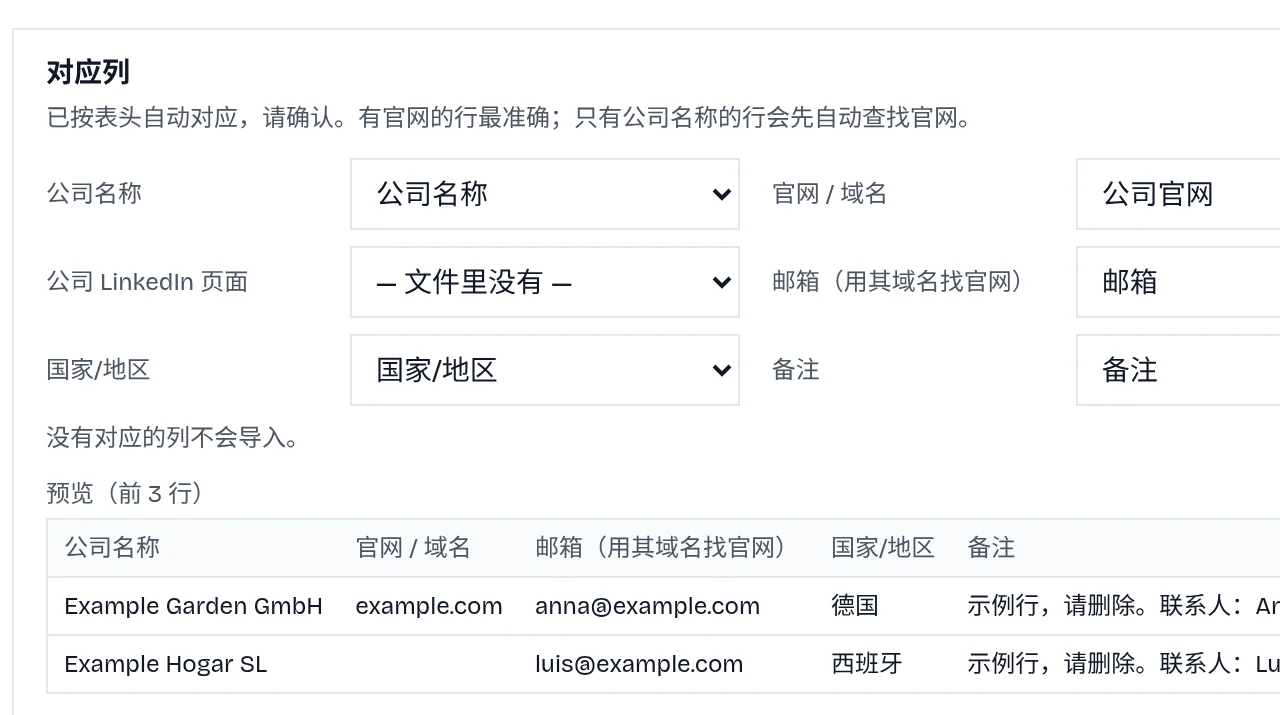
02
Complete and verify
RenewSell completes the company profile, finds the key contacts at each company and lets you verify their email addresses before anything is sent.
A finished Target (example) 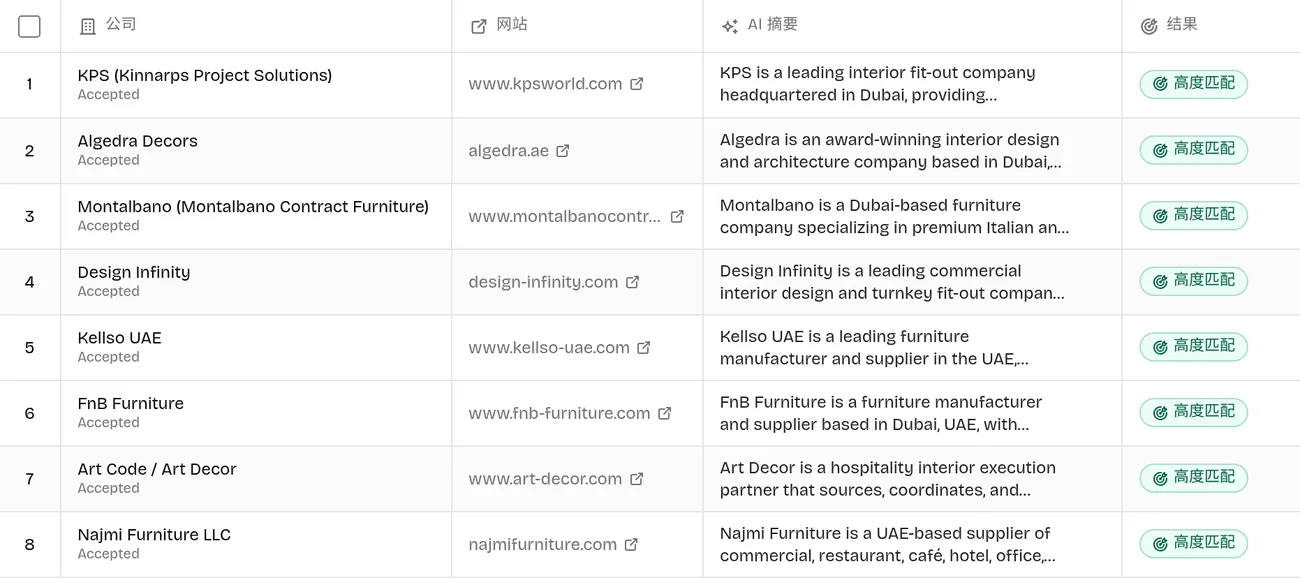
03
Follow up and answer
Smart Outreach sends the first message and follow-ups through your own account, in the language you choose, and stops when a buyer replies. Replies land in the agent's Inbox, where the AI answers first and passes the conversation to you when it cannot.
The rules Smart Outreach follows
- One first message per contact on each channel
- Optional same-thread reminder, email only
- A real reply on any channel stops the other follow-ups
- Replies appear in the agent's Inbox
Want the full step-by-step flow with every button name?Read the guide: Follow up trade-show leads
Import template
Start with the template
The columns are named so the import maps them without any work. One row is one company. Put the contact's name and title, the products they asked about, what you discussed and the date you met in Notes: they stay with the row.
Cost
What following up 100 business cards costs
Computed from the current credit prices. Skipped steps and failed work are not charged, so the real number is usually lower.
Business cards
Assumed: 100 companies from your cards, each buyer gets a first message and one follow-up.
- Import and complete company info
- Free
- Find contacts for 100 companies
- 100 credits
- Verify 100 email addresses
- 20 credits
- Send up to 200 messages
- 20 credits
Plus 500 credits a month for each connected account (your mailbox). Starter includes one mailbox; LinkedIn and WhatsApp start on Scale.
The free plan's 300 credits cover the import, finding contacts and verifying emails for a list this size. Sending needs Starter or above.
Keep reading
Where do I find buyers for my product?
FAQ
Before you send
Nothing is sent until you start the plan, and you can send the first 5 messages as a test. Outgoing emails do not carry their own unsubscribe link: when a buyer asks to stop, RenewSell recognises it, ends the conversation and blocks every later message to that person on all channels. Bounced addresses are blocked too. Whether you may contact a buyer depends on your relationship and local rules, so add your company name and address to the sign-off if your region requires it. This is not legal advice.
You connect your own accounts. Each channel follows the daily and hourly limits and sending hours you set, and the sequence stops as soon as the buyer replies. LinkedIn invitations are capped at 15 a day and 80 every 7 days, and WhatsApp messages are spaced out with random delays. No tool can promise a platform will never limit an account, so start low and raise it gradually. LinkedIn and WhatsApp need the Scale plan or above; email works from Starter.
Each agent writes in one language that you pick: English, Chinese, Spanish, German, French, Portuguese or Japanese. If your buyers come from several markets, import one list per language and run each with its own agent.
Importing is free. After that you pay per piece of work, such as 0.2 credits per verified email and 0.1 credits per sent message, plus 500 credits a month for each connected account. The example above shows the totals for 100 cards.
The reply appears in the agent's Inbox next to the whole conversation. The AI answers first using the material you gave it. When it cannot support an answer from that material, it passes the conversation to you with a suggested reply, and you can take over at any time.
Trade-show follow-up
Start before the leads go cold
Create a free account, import your list and see what it costs before you send anything.